
本文完整记录了如何在 CyberPanel + OpenLiteSpeed(OLS) 中反代本机 Docker 服务。
示例:反代 PanSou 容器的127.0.0.1:8080。... 阅读更多
分类: 随笔
CyberPanel 登录错误 提示 “Could Not Login, Error message: ‘ascii’ codec can’t encode character ‘\xa5’ in position 27: ordinal not in range(128)”
CyberPanel升级到最新版,登录后台的时候突然提示:Could Not Login, Error message: ‘ascii’ codec can’t encode character ‘\xa5’ in position 27: ordinal not in range(128)。经过查询对应资料得知Python 在处理字符串时,默认尝试用 ASCII 编码,而 ASCII 只支持 0–127 的字符范围。你的用户名、密码或某个配置文件中包含了 ¥ 或其他非 ASCII 字符,导致 Python 无法编码,登录失败。确实密码中因为安全设置了很多字符,所以我们现在只要重置密码就可以了。... 阅读更多
Notepad++ 正则表达式高效提取 SKU:从入门到精通
在处理产品数据、订单信息或任何包含大量重复格式文本的工作中,我们经常需要从成百上千行数据里提取出关键信息,比如 SKU (商品唯一编码)。一行一行地手动复制粘贴不仅效率低下,还极易出错。... 阅读更多
如何解决 Augment 插件无法在VScode使用的问题?
很多用户在使用 Augment 插件时遇到了插件显示红色,无法正常使用的问题。这可能是由于多种原因导致的,例如登录状态异常、插件配置错误等。... 阅读更多
一键 SQL 清理 WooCommerce 产品数据
有时候我们产品数量太多需要清理的时候,如果通过后台一个一个删除会很慢,因此可以直接通过数据库进行清理,注意:下面的命令会 彻底清空 WooCommerce 所有产品及相关数据(包括产品分类关系、属性、库存、元数据等),不可恢复!
执行前请 完整备份数据库,并确认表前缀(默认是 wp_,多站点或自定义可能不同:... 阅读更多
通过谷歌云 GoogleCloud GCP 试用金 300 选择 gemini AI 模型并加入自己的中转站
1、提前注册准备好一个谷歌云账号,然后绑定信用卡免费获得试用金300... 阅读更多
小皮面板(phpstudy) wordpress 多站点配置后 重定向的次数过多 问题
优化后的完整 Nginx 配置:... 阅读更多
WordPress 多站点终极指南:从零开始安装与配置(子目录与子域名模式)
WordPress 多站点终极指南:从零开始安装与配置(子目录与子域名模式)
WordPress 的多站点(Multisite)功能是一个非常强大但常被忽视的特性。它允许您通过一次 WordPress 安装,创建和管理一个由多个独立站点组成的“网络”。无论您是想为公司的不同部门创建站点、为学校社团提供博客平台,还是为客户管理多个网站,多站点功能都能极大地简化您的工作流程。... 阅读更多
小皮面板 phpstudy 安装8.0-8.3环境教程
PHP官方下载链接: https://windows.php.net/download/... 阅读更多
windows 系统 本地 http://localhost/ 配置启用ssl 变为https://localhost/
大健云仓自动导入SHOPIFY产品油猴脚本
// ==UserScript==
// @name         GIGAB2B自动批量导入(带倒计时显示+日志页面+失败快速重试)
// @namespace    http://tampermonkey.net/
// @version      1.9
// @description  GIGAB2B自动化批量导入,成功后按自定义间隔,失败后2分钟重试,并记录日志,可独立查看日志页面
// @author       你的名字
// @match        https://shop.gigab2b.com/import-list
// @grant        none
// ==/UserScript==

(function() {
    'use strict';

    let intervalId = null;
    let countdownId = null;
    let statusDiv = null;
    let countdownSeconds = 0;
    let running = false;
    let intervalMinutes = 5;
    let startBtn, stopBtn;
    let lastImportSuccess = true; // 记录上一次是否成功

    // 日志存储到 localStorage
    function saveLog(result, detail) {
        const logs = JSON.parse(localStorage.getItem('gigab2b_import_logs') || '[]');
        logs.unshift({
            time: new Date().toLocaleString(),
            result,
            detail
        });
        if (logs.length > 100) logs.length = 100;
        localStorage.setItem('gigab2b_import_logs', JSON.stringify(logs));
    }

    // 日志页面弹窗
    function showLogPage() {
        const logs = JSON.parse(localStorage.getItem('gigab2b_import_logs') || '[]');
        let html = `
            <html>
            <head>
                <title>GIGAB2B 导入日志</title>
                <style>
                    body { font-family: monospace; background: #f9f9f9; margin: 0; padding: 20px; }
                    table { border-collapse: collapse; width: 100%; }
                    th, td { border: 1px solid #ccc; padding: 8px; }
                    th { background: #eee; }
                    tr.success td { color: green; }
                    tr.fail td { color: red; }
                    .clear-btn { margin: 10px 0; padding: 5px 10px; }
                </style>
            </head>
            <body>
                <h2>GIGAB2B 导入日志</h2>
                <button class="clear-btn" onclick="localStorage.removeItem('gigab2b_import_logs');location.reload();">清空日志</button>
                <table>
                    <tr><th>时间</th><th>结果</th><th>详情</th></tr>
                    ${logs.map(log => `
                        <tr class="${log.result === '成功' ? 'success' : 'fail'}">
                            <td>${log.time}</td>
                            <td>${log.result}</td>
                            <td>${log.detail}</td>
                        </tr>
                    `).join('')}
                </table>
            </body>
            </html>
        `;
        const win = window.open('', '_blank', 'width=700,height=500');
        win.document.write(html);
        win.document.close();
    }

    // 日志和状态显示
    function log(msg) {
        if (statusDiv) statusDiv.textContent = '状态:' + msg;
        console.log(msg);
    }

    function waitForSelector(selector, timeout = 10000) {
        return new Promise((resolve, reject) => {
            const interval = 100;
            let elapsed = 0;
            const timer = setInterval(() => {
                const el = document.querySelector(selector);
                if (el) {
                    clearInterval(timer);
                    resolve(el);
                }
                elapsed += interval;
                if (elapsed >= timeout) {
                    clearInterval(timer);
                    reject('元素未出现: ' + selector);
                }
            }, interval);
        });
    }

    async function getCurrentPage() {
        try {
            await waitForSelector('.el-pager');
            const activePage = document.querySelector('.el-pager li.number.active');
            if (activePage) {
                return parseInt(activePage.textContent.trim());
            }
            return 1;
        } catch (e) {
            log('获取当前页码失败:' + e);
            return 1;
        }
    }

    async function hasNextPage() {
        try {
            const pageElements = document.querySelectorAll('.el-pager li.number');
            return pageElements.length > 1;
        } catch (e) {
            log('检查是否有下一页失败:' + e);
            return false;
        }
    }

    async function clickPage(pageNumber) {
        try {
            await waitForSelector('.el-pager');
            await new Promise(r => setTimeout(r, 2000));
            const pageElements = document.querySelectorAll('.el-pager li.number');
            for (let element of pageElements) {
                if (element.textContent.trim() === pageNumber.toString()) {
                    element.click();
                    log(`已点击第 ${pageNumber} 页`);
                    await new Promise(r => setTimeout(r, 5000));
                    const activePage = document.querySelector('.el-pager li.number.active');
                    if (activePage && activePage.textContent.trim() === pageNumber.toString()) {
                        await waitForSelector('.opbar-container__checkall input[type="checkbox"]');
                        log(`第 ${pageNumber} 页加载完成`);
                        return true;
                    } else {
                        log(`第 ${pageNumber} 页切换失败`);
                        return false;
                    }
                }
            }
            log(`未找到第 ${pageNumber} 页`);
            return false;
        } catch (e) {
            log('翻页操作失败:' + e);
            return false;
        }
    }

    async function clickSelectAll() {
        const selectAllInput = await waitForSelector('.opbar-container__checkall input[type="checkbox"]');
        if (!selectAllInput.checked) {
            selectAllInput.click();
            log('已勾选 Select All');
            await new Promise(r => setTimeout(r, 2000));
        }
    }

    async function clickImportButton() {
        const importBtn = await waitForSelector('.el-button--primary.sh-button.ml-12');
        importBtn.click();
        log('已点击 Import 按钮');
        await new Promise(r => setTimeout(r, 2000));
    }

    async function checkAboen() {
        await waitForSelector('.el-dialog__footer');
        const labels = document.querySelectorAll('.el-checkbox-group .el-checkbox');
        for (let label of labels) {
            if (label.innerText.trim().includes('aboen')) {
                const input = label.querySelector('input[type="checkbox"]');
                if (!input.checked) {
                    input.click();
                    log('已勾选 aboen');
                    await new Promise(r => setTimeout(r, 2000));
                }
                break;
            }
        }
    }

    // 记录导入成功/失败日志
    async function clickDialogImport() {
        await waitForSelector('.el-dialog__footer');
        let success = false;
        for (let i = 0; i < 10; i++) {
            const dialogs = document.querySelectorAll('.el-dialog');
            for (let dialog of dialogs) {
                if (dialog.offsetParent === null) continue;
                const btns = dialog.querySelectorAll('button.el-button--primary.sh-button');
                for (let btn of btns) {
                    if (btn.innerText && btn.innerText.trim().toLowerCase().includes('import')) {
                        btn.scrollIntoView({behavior: "auto", block: "center"});
                        btn.focus();
                        btn.click();
                        log('已点击弹窗 Import 按钮');
                        success = true;
                        await new Promise(r => setTimeout(r, 2000));
                        // 检查成功弹窗
                        const successNotification = document.querySelector('.el-notification.sh-white-notification .el-notification__title');
                        if (successNotification && successNotification.textContent.includes('Request for batch import has been submitted')) {
                            log('导入任务提交成功');
                            saveLog('成功', '导入任务提交成功');
                            return true;
                        }
                        // 检查失败弹窗
                        const errorMessage = document.querySelector('.el-message--error .el-message__content');
                        if (errorMessage) {
                            log('导入任务提交失败:' + errorMessage.textContent);
                            saveLog('失败', errorMessage.textContent);
                            return false;
                        }
                        break;
                    }
                }
                if (success) break;
            }
            if (success) break;
            await new Promise(r => setTimeout(r, 1000));
        }
        if (!success) {
            log('未找到或未能点击弹窗 Import 按钮');
            saveLog('失败', '未找到或未能点击弹窗 Import 按钮');
            return false;
        }
        return false;
    }

    async function main() {
    try {
        log('流程开始');
        await new Promise(r => setTimeout(r, 3000));

        // 判断页数
        const hasNext = await hasNextPage();

        if (hasNext) {
            // 有第二页,始终切到第二页
            await clickPage(2);
        } // 否则就在第一页

        await clickSelectAll();
        await clickImportButton();
        await checkAboen();
        const importResult = await clickDialogImport();

        lastImportSuccess = !!importResult;

        if (importResult) {
            log('导入任务成功提交,等待处理完成');
        } else {
            log('导入任务提交失败,将在2分钟后重试');
        }

        await new Promise(r => setTimeout(r, 3000));

        // 再次判断是否还有第二页
        const hasNextAgain = await hasNextPage();
        let nextInterval = importResult ? intervalMinutes * 60 : 120; // 成功用自定义,失败2分钟

        if (hasNextAgain) {
            log(`本轮流程完成,下一轮倒计时开始:${nextInterval}秒`);
            startCountdown(nextInterval, 2); // 始终切到第二页
        } else {
            log('所有操作已完成,脚本停止');
            running = false;
            if (countdownId) clearInterval(countdownId);
            if (statusDiv) statusDiv.textContent = '状态:所有操作已完成';
            if (startBtn) startBtn.disabled = false;
            if (stopBtn) stopBtn.disabled = true;
        }
    } catch (e) {
        log('自动化流程出错:' + e);
        saveLog('失败', '自动化流程出错:' + e);
        startCountdown(120, 1); // 出错也2分钟重试
    }
}

function startCountdown(seconds, nextPage) {
    const targetTime = Date.now() + seconds * 1000;
    if (countdownId) clearInterval(countdownId);
    countdownId = setInterval(() => {
        if (!running) {
            clearInterval(countdownId);
            return;
        }
        const now = Date.now();
        countdownSeconds = Math.max(0, Math.round((targetTime - now) / 1000));
        if (statusDiv) statusDiv.textContent = '状态:本轮流程完成,下一轮倒计时开始:' + countdownSeconds + '秒';
        if (countdownSeconds <= 0) {
            clearInterval(countdownId);
            if (running) {
                main(); // 直接进入 main,由 main 决定是否切页
            }
        }
    }, 1000);
}

    function createControlPanel() {
        const panel = document.createElement('div');
        panel.style.position = 'fixed';
        panel.style.right = '30px';
        panel.style.bottom = '30px';
        panel.style.background = 'white';
        panel.style.border = '1px solid #ccc';
        panel.style.padding = '16px';
        panel.style.zIndex = 99999;
        panel.style.boxShadow = '0 2px 8px rgba(0,0,0,0.15)';
        panel.style.borderRadius = '8px';

        const label = document.createElement('label');
        label.textContent = '循环间隔(分钟): ';
        const input = document.createElement('input');
        input.type = 'number';
        input.value = 5;
        input.min = 1;
        input.style.width = '50px';
        label.appendChild(input);

        startBtn = document.createElement('button');
        startBtn.textContent = '开始';
        startBtn.style.marginLeft = '10px';

        stopBtn = document.createElement('button');
        stopBtn.textContent = '停止';
        stopBtn.style.marginLeft = '10px';
        stopBtn.disabled = true;

        const logBtn = document.createElement('button');
        logBtn.textContent = '查看日志';
        logBtn.style.marginLeft = '10px';
        logBtn.onclick = showLogPage;

        statusDiv = document.createElement('div');
        statusDiv.textContent = '状态:等待开始';
        statusDiv.style.marginTop = '10px';
        statusDiv.style.fontSize = '14px';

        panel.appendChild(label);
        panel.appendChild(startBtn);
        panel.appendChild(stopBtn);
        panel.appendChild(logBtn);
        panel.appendChild(statusDiv);
        document.body.appendChild(panel);

        startBtn.onclick = () => {
            intervalMinutes = parseInt(input.value, 10);
            if (isNaN(intervalMinutes) || intervalMinutes < 1) {
                alert('请输入有效的循环间隔(最小1分钟)');
                return;
            }
            startBtn.disabled = true;
            stopBtn.disabled = false;
            running = true;
            log('已启动循环,每' + intervalMinutes + '分钟执行一次');
            main();
        };

        stopBtn.onclick = () => {
            running = false;
            if (intervalId) clearInterval(intervalId);
            if (countdownId) clearInterval(countdownId);
            intervalId = null;
            countdownId = null;
            startBtn.disabled = false;
            stopBtn.disabled = true;
            log('已停止循环');
        };
    }

    setTimeout(() => {
        createControlPanel();
    }, 2000);

})();网页解除限制 解除右键禁用 进阶版
解除右键禁用
解除选取和复制禁用
开启/关闭整个页面的编辑功能
快速一键开启所有功能
自由开关这个小工具面板... 阅读更多
windows – 更改用户账户名称(windows10 / 11)
有时候,装完 windows 10 系统后,发现用户名已经自己创建好了(常见于 U盘 装机盗版系统),如果想要更改账户名,是无法直接通过设置更改的。... 阅读更多
vscode提取扩展时出错,提示:提取扩展时出错 Failed to fetch
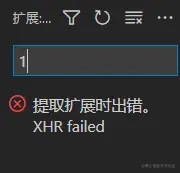
考虑到获取新的扩展是需要连接网络的,而我的网络是好的,vscode的其他需要联网的功能也都可以使用,这时候最有可能的是代理服务器的问题。... 阅读更多
更改计算机上的远程桌面的侦听端口3389为其他端口
通过远程桌面客户端连接到计算机(Windows 客户端或 Windows Server)时,计算机上的远程桌面功能会通过定义的侦听端口(默认情况下为 3389)“侦听”连接请求。 可以通过修改注册表来更改 Windows 计算机上的侦听端口。... 阅读更多
油猴插件空值temu产品详情页编辑表格宽度 方便填写数据
油猴插件添加如下脚本:... 阅读更多
通过115挂载onedrive网盘,然后rclone挂载到云服务器,在使用脚本生成strm文件
1、安装必要的软件以及包
# 更新系统包
apt update

# 安装Python3和pip
apt install -y python3 python3-pip

# 安装需要的Python包
pip3 install tmdbsimple requests parse-torrent-name
2、创建工作和日志目录
# 创建脚本目录
mkdir -p /root/scripts

# 创建日志文件
touch /var/log/media_generator.log
chmod 644 /var/log/media_generator.log
3、创建主脚本文件:
# 创建并编辑脚本文件
nano /root/scripts/generate_media_files.py
将以下完整代码复制到编辑器中:... 阅读更多
emby alist rclone 常用命令收集
15分享链接批量转存,支持历史记录避免重复转存
Emby + Alist + OneDrive 无转码直链方案
背景介绍
通过 Nginx 的 njs 模块实现 Emby 视频请求直接重定向到 OneDrive 直链,避免服务器转码和流量消耗。... 阅读更多